
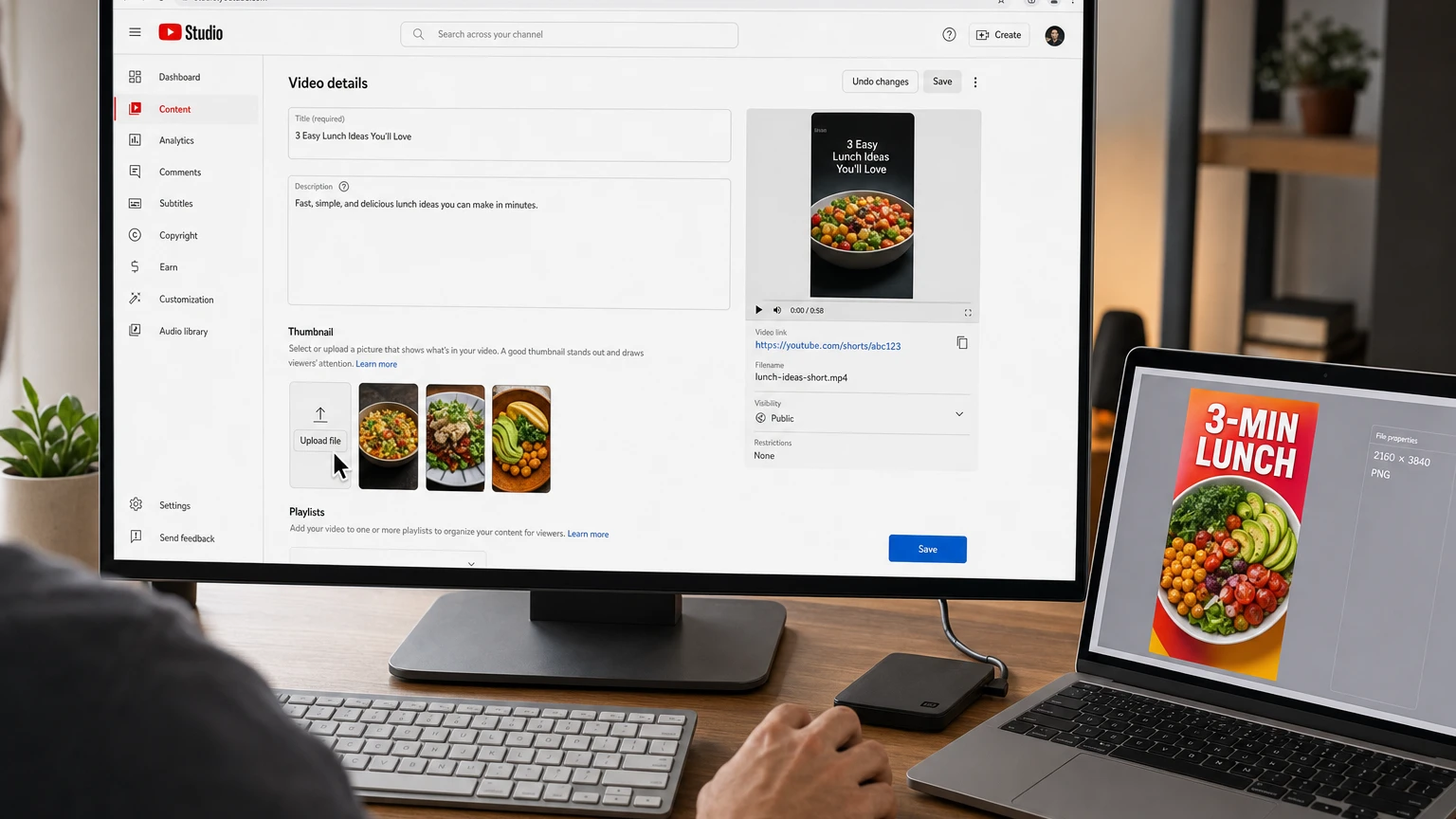
YouTube Shorts custom thumbnails are finally becoming a standard creator tool. YouTube announced the long-requested feature on July 24, 2026, initially giving YouTube Partner Program creators the ability to upload a separate image for a Short instead of relying entirely on a frame taken from the video.
The eligibility language has already evolved. As of September 8, 2026, YouTube’s current Help Center says an account must be verified to upload a custom Shorts thumbnail. That is broader wording than the original YPP-only launch announcement, indicating that YouTube has begun expanding access as promised.
There is still an important limitation: an external image can currently be added only through YouTube Studio on a computer. The mobile YouTube app offers a different tool—it lets creators select and decorate a frame from the Short, but it does not upload an independent image from the phone’s gallery as a custom Shorts thumbnail.
Who can upload YouTube Shorts custom thumbnails?
The answer depends partly on when the feature reached your account.
| Creator status | What YouTube currently says | What to check |
|---|---|---|
| YouTube Partner Program creator | Included in the original July 24 rollout | Look for Upload file under Thumbnail in desktop Studio |
| Verified creator outside YPP | The current Help Center says verified accounts can use the feature | Confirm phone verification and check the Short’s details page |
| Unverified account | Not eligible for custom thumbnail uploads | Complete account verification first |
| Creator using only a phone or tablet | Cannot upload an independent custom image through the mobile apps | Use a computer, or select a video frame in the YouTube app |
At launch, YouTube explicitly limited custom Shorts uploads to creators in the YouTube Partner Program and said it would expand the feature over time. The live support documentation now describes verification—not YPP membership—as the requirement.
The practical test is therefore the interface on your own account. Sign in to YouTube Studio on a computer, open a Short and look beneath the Thumbnail heading. If Upload file appears, your channel has access.
If it does not appear, verify that you are using the correct channel, that the channel has completed phone verification and that you are editing the video through the desktop version of Studio. A staged rollout or account-specific eligibility restriction may also explain why two otherwise similar channels see different controls.
How to upload a custom thumbnail for an existing Short
YouTube’s documented desktop workflow is straightforward:
- Sign in to YouTube Studio on a computer.
- Select Content from the left menu.
- Open the Shorts tab at the top of the content list.
- Find the Short you want to update and open its details.
- Under Thumbnail, click Upload file.
- Select the prepared image from your computer.
- Review the preview and click Save.
YouTube warns that thumbnail changes may take time to appear everywhere. An unchanged image immediately after saving does not necessarily mean the upload failed.
Uploading a thumbnail with a new Short
You can also attach the image while uploading a new Short from a computer:
- Open YouTube Studio and select Create, followed by Upload videos.
- Select the square or vertical video file that will be published as a Short.
- Complete the title, audience and other required details.
- Use Upload file in the Thumbnail section when the option is available.
- Finish the visibility settings and publish or schedule the Short.
Uploading the thumbnail before publication is preferable when the Short is part of a coordinated launch, campaign or serialized format. It avoids a period in which the video may appear with a less useful automatically selected frame.
YouTube Shorts thumbnail requirements
YouTube now publishes Shorts-specific recommendations rather than applying the familiar 16:9 long-form template to every video.
| Requirement | Recommendation for Shorts |
|---|---|
| Aspect ratio | 9:16 vertical |
| Recommended resolution | 2160 × 3840 pixels |
| Minimum dimension | At least 640 pixels high |
| Supported formats listed by YouTube | JPG or PNG |
| Desktop file-size limit | Under 50 MB |
| Policy requirement | Must comply with YouTube Community Guidelines |
A 2160 × 3840 file is YouTube’s recommended high-resolution target, not a requirement to upscale a small or blurry source image. A clean lower-resolution vertical design can look better than an artificially enlarged image filled with compression artifacts.
Use RGB color and export the finished asset as a JPG for photographic designs or a PNG when crisp typography, logos or flat-color graphics are important. Keep the file vertical from the beginning rather than squeezing a 16:9 long-form thumbnail into a tall canvas.
Desktop upload and mobile thumbnail editing are different features
Much of the contradictory advice about YouTube Shorts custom thumbnails comes from treating two separate workflows as if they were the same.
| Capability | YouTube Studio on a computer | YouTube app on a phone |
|---|---|---|
| Upload an external JPG or PNG | Yes, for eligible verified accounts | No |
| Choose a frame from the Short | Three suggested frames are available | You can scrub through the video and select a frame |
| Add thumbnail text or filters | Not part of the basic file-upload control | Available with the frame-selection editor |
| Edit after the Short is published | Yes, by uploading or replacing the custom image | Yes, by choosing and editing a video frame |
| Best option for brand consistency | External custom image | Carefully composed frame with text or filters |
This distinction explains why older tutorials often insist that custom images cannot be uploaded for Shorts. That advice was correct before the July 2026 update but is now incomplete for eligible desktop users.
How to change a Shorts thumbnail on mobile
If you do not have desktop upload access, YouTube’s mobile frame editor remains a useful alternative.
Before publishing:
- Create or import the Short in the YouTube app.
- Continue to the final upload screen.
- Tap the edit control displayed on the thumbnail preview.
- Scrub through the video and select the frame you want.
- Add text or apply a filter if needed.
- Tap Done and finish uploading the Short.
To change the selected frame after publishing:
- Open the YouTube app and go to your channel.
- Open Your videos.
- Tap the More menu beside the Short and select Edit.
- Choose a new frame and make any available text or filter edits.
- Tap Done.
These mobile edits modify a frame taken from the video. They do not turn a separately designed image in the phone’s gallery into a custom thumbnail.
How to design a Shorts thumbnail that survives a small screen
The technical requirements only prevent upload errors. They do not make a thumbnail understandable. A useful design has to communicate the Short’s subject at a glance, often at a size smaller than a phone app icon.
A practical framework is SCAN:
- Subject: Give the viewer one obvious person, object, result or action to notice first.
- Contrast: Separate the main subject from the background through color, brightness, scale or focus.
- Anticipation: Show the setup, tension or outcome the video will resolve without misrepresenting it.
- Native vertical composition: Design for 9:16 rather than adapting a crowded horizontal thumbnail.
Use less text than you would on a long-form thumbnail
Shorts thumbnails are narrow, and the interface may reduce them significantly on discovery surfaces. If text is necessary, use a short phrase that remains legible when the image is viewed at roughly one-quarter of its design size.
Avoid repeating the entire title. The title can carry detail; the thumbnail should provide instant recognition. Three large words usually communicate more effectively than a seven-word sentence squeezed into several lines.
Protect the center and critical subject
Keep faces, product details and essential text away from the outer edges. YouTube may display previews at different sizes, and interface elements can compete with artwork in mobile contexts. A centered visual hierarchy gives the design more tolerance across placements.
Make the promise match the opening seconds
A custom image may earn attention, but the first second of the video has to confirm the same promise. If the thumbnail shows a finished recipe, dramatic transformation or specific product test, the opening should immediately establish that subject.
This alignment is more important for Shorts than elaborate thumbnail polish. Viewers entering a vertical feed encounter the moving video quickly, so weak opening footage cannot be repaired by a strong static image.
Where a Shorts thumbnail is likely to matter most
Confirmed: YouTube describes thumbnails as a way to help viewers discover content and understand what to expect. The platform has also invested in desktop frame suggestions and mobile frame editing alongside custom uploads.
Interpretation: The largest practical benefit should occur on surfaces where a viewer sees a static preview and chooses among videos—for example, channel pages, search results and browsing contexts. Once a viewer is actively swiping through the Shorts feed, the opening footage, subject clarity and retention become more important than the static cover.
YouTube has not said that uploading a custom thumbnail directly improves a Short’s recommendation ranking. Treat it as packaging, not an algorithm switch. Its job is to attract the right viewer and accurately set expectations.
What the new feature still does not include
- No native A/B testing for Shorts: YouTube’s title and thumbnail testing tool currently excludes Shorts.
- No mobile image upload: External Shorts thumbnail files must currently be added in YouTube Studio on a computer.
- No guaranteed performance lift: A custom design can improve clarity without automatically producing more views.
- No exemption from thumbnail policies: Shorts thumbnails remain subject to YouTube’s Community Guidelines.
- No reason to ignore the video’s first frame: The moving content still needs an immediate, understandable hook.
YouTube also introduced Ask Studio thumbnail generation in the same July announcement, but described that generation feature for long-form videos. Creators should not assume that Ask Studio can generate and publish custom Shorts thumbnails unless the option appears in their own workflow.
Troubleshooting YouTube Studio Shorts thumbnails
The Upload file button is missing
- Confirm that you are using YouTube Studio in a desktop browser, not the Studio mobile app.
- Open Content, switch to the Shorts tab and edit the individual Short.
- Check that you are signed in to the intended channel or Brand Account.
- In Studio, open Settings, Channel and Feature eligibility to review verification status.
- Complete phone verification if custom thumbnails are not enabled.
- If the account is verified but the control remains absent, the expanded rollout may not yet have reached that channel.
You only see three suggested images
The three suggestions are YouTube’s desktop frame options. Eligible accounts should also see an upload control in the Thumbnail area. If you need any frame rather than one of the three suggestions, use the YouTube mobile app’s frame selector.
You cannot select an image from your phone
This is an interface limitation, not necessarily an account problem. The mobile workflow edits frames from the Short. Transfer the JPG or PNG to a computer and use desktop YouTube Studio to upload it as an independent image.
The new thumbnail has not appeared
First confirm that you clicked Save. Then allow time for YouTube’s different surfaces and cached previews to update. Replacing the file repeatedly is unlikely to make propagation faster and can make it harder to determine whether the original change worked.
The thumbnail was rejected or removed
Review it for nudity or sexually provocative imagery, hate speech, violence, and harmful or dangerous content. YouTube says violating thumbnails may be rejected or lead to a strike. Repeated violations can temporarily remove custom-thumbnail privileges and may produce more serious account consequences.
You reached the daily custom thumbnail limit
YouTube limits how many custom thumbnails a channel can upload per day. The threshold can vary with region and channel history. If Studio reports that the daily limit has been reached, YouTube advises trying again after 24 hours.
The design is cropped or looks like a long-form thumbnail
Check that the uploaded canvas is 9:16. A 16:9 image placed on a vertical video can be cropped, reformatted or displayed inconsistently on different surfaces. Rebuild the design as a native vertical asset rather than adding large empty bars around a horizontal thumbnail.
A practical thumbnail workflow for Shorts creators
- Plan the cover before editing. Decide which subject or result should represent the Short.
- Capture a clean source image. Use a still photo or export a sharp video frame without motion blur.
- Build at 2160 × 3840. Keep the design vertical and place essential elements away from the edges.
- Run a small-size test. Shrink the image until it is thumbnail-sized and check whether the subject and text remain clear.
- Compare it with the title. Remove duplicated language and make sure the two elements work together.
- Upload through desktop Studio. Use the Shorts tab and save the updated details.
- Inspect multiple YouTube surfaces. Check the channel page, search appearance and other available previews after the change propagates.
- Measure carefully. Compare similar Shorts over time, but do not attribute every view change to the thumbnail when topics, hooks, timing and audience response also differ.
The bottom line
YouTube’s July 24, 2026 update removed one of the clearest packaging disadvantages facing Shorts creators. Eligible channels can now upload a true custom image rather than choosing only from frames contained in the video.
The launch began with YPP creators, while YouTube’s current documentation says the account must be verified. The upload itself remains a desktop YouTube Studio feature: open Content, select Shorts, edit the video, choose Upload file beneath Thumbnail and save.
Creators without the desktop option still have a capable mobile alternative. The YouTube app can select a frame before or after publication and add text or filters. Whichever method you use, the best Shorts thumbnail is not simply eye-catching—it makes a clear, accurate promise that the video fulfills immediately.
Make YouTube smarter with NextWatch AI
Use AI search, smarter discovery, playback tools and speed testing directly in your browser.
Add NextWatch AI to Chrome ↗