
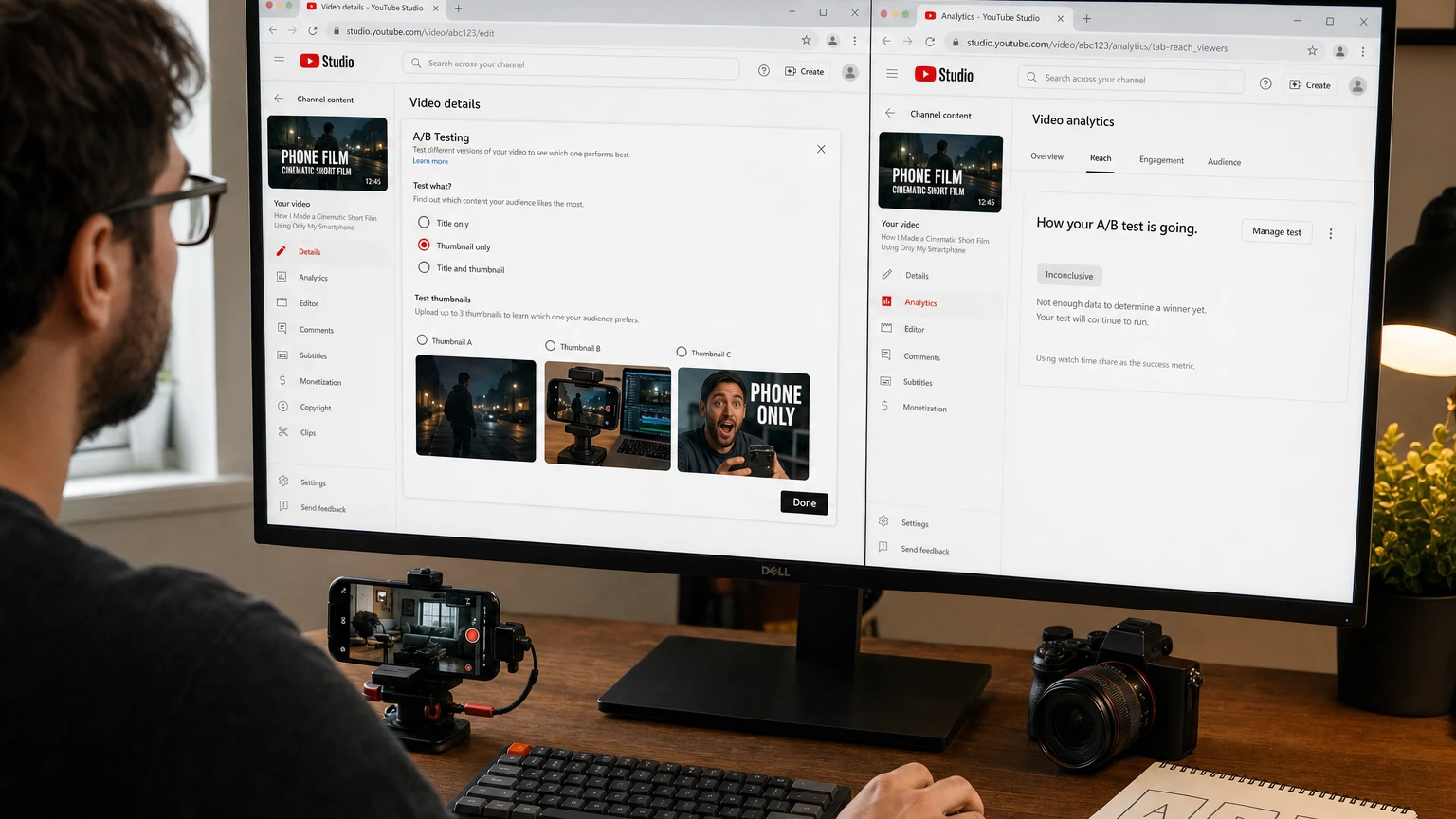
YouTube Thumbnail Test and Compare lets creators show different thumbnail options to real viewers and use the resulting behavior to choose stronger packaging. It is more useful than simply asking which design looks best because YouTube evaluates whether each option produces watch time, not just clicks.
The interface has evolved since the thumbnail-only tool launched. As of September 10, 2026, current YouTube Studio documentation describes a broader A/B Testing workflow that can test a title, a thumbnail, or a title-and-thumbnail combination. Creators looking for the familiar YouTube Thumbnail Test and Compare feature should select Thumbnail only. Older documentation and screenshots may still call the entry point Test & compare.
The buttons are straightforward. Running a useful experiment is harder. Your variants must be different enough to reveal a preference, comparable enough to answer a specific question, and honest enough that the winning image attracts viewers who actually want the video.
YouTube Thumbnail Test and Compare at a glance
| Question | Current answer |
|---|---|
| Where is it available? | On a computer through YouTube Studio |
| What access is required? | Advanced features must be enabled for the channel |
| How many options can you test? | Up to three, making an A/B or A/B/C test possible |
| What should you select? | Choose Thumbnail only if you want to isolate thumbnail performance |
| Which content is supported? | Eligible long-form videos, podcast episodes and live archives; Premieres become eligible after the Premiere ends |
| What is excluded? | Shorts, scheduled live streams, active Premieres, private videos, made-for-kids videos and mature or age-restricted content |
| How long does a test take? | A few days in some cases, but it can run for up to two weeks |
| How is the winner selected? | By overall watch time or watch-time share, rather than click-through rate alone |
| Where are results found? | On the video Details page or under Analytics, Reach and the test management panel |
How YouTube's native thumbnail test works
YouTube distributes the eligible thumbnail variations concurrently. In other words, different viewers can see different options during the same testing period. This is an important advantage over a sequential test in which one thumbnail runs this week and another runs next week.
Concurrent distribution reduces the effect of unrelated changes such as weekday viewing patterns, news cycles, recommendation traffic and the changing age of the upload. It cannot eliminate every source of variation, but it provides a cleaner comparison than manually changing the thumbnail at different times.
YouTube may also retain a small control group that sees the default option and is excluded from experiment calculations. Creators do not need to configure this group.
At the end, YouTube displays the option with the strongest supported watch-time performance. If it cannot identify a clear winner, the first uploaded option becomes the default unless you manually choose another one.
Why you should use Thumbnail only
The current workflow can test titles and thumbnails together, but combining them answers a different question. A title-and-thumbnail test identifies the best package; it does not tell you whether the title, thumbnail or interaction between them caused the difference.
If your objective is to improve thumbnail strategy, keep the video and title constant and select Thumbnail only. Once you understand which visual approach works, you can run a separate title test. This produces more reusable knowledge than changing every packaging element at once.
Eligibility checklist before starting
Check eligibility before spending time producing three polished designs. A missing button often reflects the channel, device or video's status rather than a temporary Studio error.
- Use a computer: The native testing workflow is currently a desktop YouTube Studio feature.
- Enable advanced features: Open Studio settings, select Channel and review Feature eligibility. Phone verification is required before the additional channel-history or identity requirements used for advanced access.
- Choose supported content: Public long-form videos are the safest test candidates. Podcast episodes and archived live streams can also qualify.
- Wait for a Premiere to end: An active or scheduled Premiere is not eligible, but the resulting long-form video can become eligible afterward.
- Check audience settings: Videos marked made for kids, mature or age-restricted cannot use the test.
- Check visibility: Private videos are excluded.
- Confirm the format: Shorts are not eligible, even when the channel can upload a custom Shorts thumbnail.
Custom thumbnails and thumbnail A/B testing are separate capabilities. YouTube has expanded custom Shorts thumbnail options, but that does not make Shorts eligible for this experiment. For format-specific instructions, see our guide to YouTube Shorts custom thumbnails.
How to run a YouTube thumbnail A/B test
- Define the question. Decide what you want to learn before opening a design tool. A useful question might be whether viewers respond more strongly to the finished result or to the process used to create it.
- Prepare two or three thumbnails. Give every option the same technical quality. Avoid making one a polished final design and another a rough placeholder.
- Open YouTube Studio on a computer. For an existing upload, select Content and open the video's details. For a new upload, begin the normal upload workflow.
- Open the testing menu. Click A/B Testing in the Title or Thumbnail area. An older interface may show Test & compare under Thumbnail.
- Select Thumbnail only. This keeps the title constant and makes the result easier to interpret.
- Upload up to three options. Put your current or control design first if you want it to become the default when no winner is established.
- Click Done and publish. A test created during an upload starts after the video is published.
- Let the experiment collect data. Avoid changing the title or thumbnail while it is running. A manual change can stop the test and force you to restart it.
- Review the report. Open the video's Analytics, select Reach and find the A/B test panel. You can also view results from the Details page.
- Record the lesson. Save the variants, hypothesis, result and next decision. The long-term value comes from patterns across multiple videos, not one winner.
You can stop a running test and select an option manually, but doing so sacrifices the chance of reaching a more conclusive result. Stop early only when there is a genuine problem, such as a factual mistake, unreadable text, policy concern or thumbnail that misrepresents the video.
How to design thumbnail variants that teach you something
Three almost identical images may produce no meaningful difference. Three unrelated images can produce a result without explaining why. The strongest method sits between those extremes: controlled contrast.
Keep the video's core promise constant while changing one major way that the promise is communicated.
For example, imagine a video about producing a short film with a phone. A useful set could be:
- Option A, outcome-led: The best cinematic frame from the completed film.
- Option B, process-led: A phone beside the editing timeline or camera setup.
- Option C, personality-led: The creator's reaction paired with one concise statement about the constraint.
All three represent the same video, but each emphasizes a different reason to watch. The test can now reveal whether the audience is primarily motivated by the result, the method or the human challenge.
High-value elements to test
- Outcome versus process: Show what viewers will achieve or how the work is done.
- Face versus object: Compare a recognizable person with the product, location or result at the center of the story.
- Wide context versus close detail: Test environmental scale against a tightly framed point of interest.
- Text versus no text: Determine whether a short phrase adds information that the title does not already provide.
- Question versus proof: Contrast an unresolved mystery with visual evidence of the answer.
- Positive versus high-stakes framing: Compare an aspirational result with a problem, risk or surprising failure.
Low-value variations to avoid
- Moving the same text a few pixels
- Testing nearly identical facial expressions
- Changing only a border color
- Using three synonyms in otherwise identical designs
- Comparing different compression quality or resolution
- Changing the thumbnail and title together when you need a thumbnail-specific lesson
Small visual changes can matter, but they often require substantial traffic to distinguish. Test major concepts first. Once you identify a reliable direction, narrower tests can refine details such as crop, text treatment or object placement.
Technical preparation for fair thumbnail tests
A strong concept can lose if it is blurred, badly cropped or unreadable on small screens. Prepare every candidate to the same standard so the experiment measures creative strategy rather than export quality.
- Use a 16:9 canvas for long-form video.
- Export all variants at the same dimensions. YouTube currently recommends high-resolution uploads and lists 3840 by 2160 pixels for standard video thumbnails.
- Keep every experiment option at or above 1280 by 720. If any submitted option is below 720p, YouTube says all experiment thumbnails may be downscaled to 854 by 480.
- Use supported image files: JPG and PNG are dependable choices.
- Check the mobile-size preview: Text and important objects should remain legible when the design is reduced.
- Inspect edges and overlays: Avoid placing essential details where timestamps or interface elements may compete with them.
- Represent the video accurately: A misleading image can attract the wrong viewer and undermine watch-time performance, in addition to creating policy or trust problems.
Why YouTube chooses winners by watch time
A conventional thumbnail discussion often revolves around impressions click-through rate, or CTR: how often someone watches after seeing the thumbnail. CTR is useful, but a click alone does not show that the packaging matched the content.
YouTube's test instead emphasizes the watch time generated by each option. This rewards a thumbnail that attracts viewers who continue watching. A sensational or ambiguous design might generate more clicks while producing less watch time if the video does not fulfill the expectation it created.
YouTube does not publish a complete creator-facing formula for its experiment calculations. A useful planning model is:
Effective thumbnail performance is a combination of qualified clicks and the depth of the viewing those clicks produce.
Consider this hypothetical example. The figures are illustrative, not a recreation of YouTube's statistical system.
| Variant | Impressions | Illustrative CTR | Views | Average viewing | Watch minutes |
|---|---|---|---|---|---|
| A | 100,000 | 8% | 8,000 | 3 minutes | 24,000 |
| B | 100,000 | 6.5% | 6,500 | 5 minutes | 32,500 |
Variant A wins on CTR, but Variant B generates more viewing. That can happen when B communicates the video's subject more precisely and attracts a better-matched audience.
A thumbnail winner therefore does not automatically mean that the image had the highest CTR. Review the normal Reach and Engagement reports after the experiment. CTR, average view duration, audience retention and traffic sources can help you understand why the selected option worked.
How to interpret Winner, Performed Same and Inconclusive
Current YouTube documentation uses three primary outcomes. Older Thumbnail Test and Compare materials use a different label set, so creators may encounter both when consulting past reports or tutorials.
| Result | What it means | What to do |
|---|---|---|
| Winner | One option clearly outperformed the others on watch-time share with sufficient statistical confidence. | Use it, then record the creative difference that may have contributed to its performance. |
| Performed Same | The test ran, but the options performed about the same. | Select the clearest or most brand-consistent option. Test a larger conceptual difference next time. |
| Inconclusive | YouTube did not establish a strong statistical difference between the options. | Treat the result as unproven. Keep the first option, choose manually or develop a more distinct test. |
What Preferred and None mean in older reports
The earlier thumbnail-only workflow described results as Winner, Preferred or None.
- Preferred: One thumbnail likely performed better, but the improvement was not strong enough for YouTube to declare a statistically confident winner. Treat this as a directional signal, not proof.
- None: The thumbnails performed similarly and no strong engagement difference was established. The first uploaded thumbnail becomes the default unless you choose another.
The wording has changed, but the practical lesson remains the same: only a Winner is a clear result. Other labels are invitations to use judgment, improve the next experiment and gather more evidence across the channel.
How long should a thumbnail test run?
YouTube says an A/B test can take a few days and should finish within two weeks. The timing depends partly on impressions, the video's age and the size of the performance difference between options.
A high-traffic video with sharply different variants may produce a result more quickly. A low-traffic video or a test containing near-duplicates may remain unresolved. Time alone cannot create statistical power when almost nobody sees the thumbnails.
Do not judge the options from an early percentage split. Initial audiences may be dominated by subscribers and returning viewers, while later distribution may reach less familiar viewers. Let the native test complete unless the packaging contains a problem that justifies stopping it.
Should you test a new or older video?
New uploads offer faster traffic but carry more risk: a weaker option may receive part of an important launch window, and the composition of the audience can change rapidly. YouTube recommends beginning with selected older videos to reduce the potential effect on overall views.
The ideal first candidate is not a dead upload with almost no impressions. Look for an evergreen video that still receives steady Browse, Suggested or Search exposure. It should have enough ongoing reach to feed the experiment and enough future value to justify improving its packaging.
Native YouTube testing versus third-party tools
| Factor | YouTube native A/B testing | Common third-party approach |
|---|---|---|
| Distribution | Shows variations concurrently to YouTube viewers | May rotate options sequentially during different time periods |
| Primary decision metric | Overall watch time or watch-time share | Often focuses on CTR, clicks or stated preference |
| Audience | Uses viewers encountering the actual video on YouTube | May use panels, surveys, simulated feeds or changing live traffic |
| Platform integration | Built into YouTube Studio and Analytics | May require permissions, extensions or external dashboards |
| Best use | Selecting packaging based on actual viewing behavior | Generating concepts, pre-screening options or tracking additional creative data |
Sequential and concurrent experiments can return different results even when both are implemented competently. A thumbnail used later may face a different audience, traffic-source mix or recommendation environment. A tool optimizing for CTR may also prefer an option that YouTube's watch-time evaluation does not select.
Third-party tools can still be useful for creative research and workflow management. Treat YouTube's native result as the stronger evidence when your question is which thumbnail produces better watch-time performance for that specific video.
Why a test may not produce a winner
- The variants are too similar. Minor color, crop or text changes may not alter viewer behavior enough to detect.
- The video has too few impressions. An old upload is not useful if it receives virtually no continuing exposure.
- Every option works equally well. No winner can be good news when all three designs communicate the idea effectively.
- Every option has the same underlying weakness. Three different layouts cannot fix an uninteresting promise or unclear topic.
- The audience changed during the test. Early viewers and later viewers may respond differently, especially on recent uploads.
- The effect is real but small. YouTube may not have enough evidence to separate a subtle performance difference from normal statistical variation.
Do not repeatedly rerun the same options until one happens to receive a Winner label. That encourages you to mistake random variation for a stable preference. A rerun is more useful when you have a new hypothesis or a meaningful change to test.
Troubleshooting YouTube Studio thumbnail tests
The A/B Testing or Test & compare button is missing
- Open YouTube Studio on a computer rather than relying on the mobile app.
- Check Settings, Channel and Feature eligibility to confirm that advanced features are enabled.
- Confirm that you opened a supported long-form video rather than a Short.
- Check visibility, audience and age-restriction settings.
- If it is a Premiere, wait until the event ends and it becomes a regular long-form video.
- Remember that YouTube began rolling out an updated Studio experience in July 2026, so navigation and labels can differ between accounts.
The test stopped unexpectedly
Changing a video's title or thumbnail during an active experiment can stop it. An eligibility change can also prevent the test from continuing. Recheck the video's format, visibility, audience classification and restrictions before restarting.
Every candidate looks blurry
Inspect all uploaded files, not just the blurry candidate. YouTube warns that when any experiment thumbnail is below 720p, every option may be downscaled. Re-export the full set at matching high resolution.
The test is still running after several days
This is not automatically an error. Tests can take up to two weeks. Low impressions, a recently published video and similar creative options can all extend the process.
The result conflicts with another tool or earlier test
Compare the method, metric and audience before deciding that one result is wrong. A concurrent watch-time test is answering a different question from a sequential CTR test. Reruns can also vary naturally as the video's audience changes.
A repeatable thumbnail-testing framework
A channel improves when individual tests become a body of evidence. Use the following cycle instead of treating each winner as an isolated design verdict.
- Audit: Find an eligible video with continuing impressions and packaging that may be limiting its appeal.
- Hypothesize: Write one sentence predicting what viewers value. For example: “Showing the completed room will generate more qualified viewing than showing the renovation process.”
- Contrast: Build two or three materially different expressions of the same promise.
- Run: Use Thumbnail only and avoid manual packaging changes while the test is active.
- Interpret: Separate proven Winners from directional or inconclusive outcomes.
- Validate: Apply the idea to another relevant video. One result may be specific to one topic.
- Systematize: Turn repeated patterns into thumbnail guidelines for the channel.
Maintain a simple testing log:
| Field | What to record |
|---|---|
| Video | Title, publication date and primary traffic sources |
| Hypothesis | The audience preference being tested |
| Variants | What A, B and C changed |
| Result | Winner, Performed Same, Inconclusive or a legacy label |
| Decision | The thumbnail ultimately selected |
| Lesson | A short statement that can guide another video |
| Follow-up | The next test needed to validate or refine the lesson |
After several tests, look for recurring patterns by topic and traffic source. Search-led tutorials may respond to explicit visual proof, while Browse-led entertainment videos may benefit from curiosity or personality. Treat this as a hypothesis to verify on your own audience, not a universal rule.
Common mistakes that weaken thumbnail experiments
- Testing three decorative tweaks: Use concept-level contrast before optimizing tiny details.
- Changing the title at the same time: This makes it impossible to isolate the thumbnail's contribution.
- Using clickbait as one option: Watch-time optimization can punish a promise the video does not fulfill.
- Ignoring the first upload position: The first option can become the default when there is no clear winner.
- Testing videos without ongoing impressions: Eligibility does not guarantee enough data.
- Stopping after a few hours: Early traffic may not represent the audience that encounters the video later.
- Calling Preferred or Inconclusive a win: Directional evidence is not statistical certainty.
- Copying another channel's winner: A design that works for a familiar personality or audience may communicate nothing to yours.
- Failing to record the hypothesis: Without a stated question, teams tend to invent explanations after seeing the result.
The best way to use YouTube Thumbnail Test and Compare
Start with one eligible evergreen video, one specific audience hypothesis and three strong concepts. Keep the title unchanged, select Thumbnail only, give the test time to finish and interpret the result according to its confidence label.
Most importantly, optimize for the right click rather than the maximum number of clicks. The best thumbnail does not merely interrupt scrolling. It sets an accurate expectation, attracts a viewer who wants the video and helps turn an impression into meaningful watch time.
A single result can improve one upload. A disciplined testing record can improve how an entire channel presents its ideas.
Make YouTube smarter with NextWatch AI
Use AI search, smarter discovery, playback tools and speed testing directly in your browser.
Add NextWatch AI to Chrome ↗