
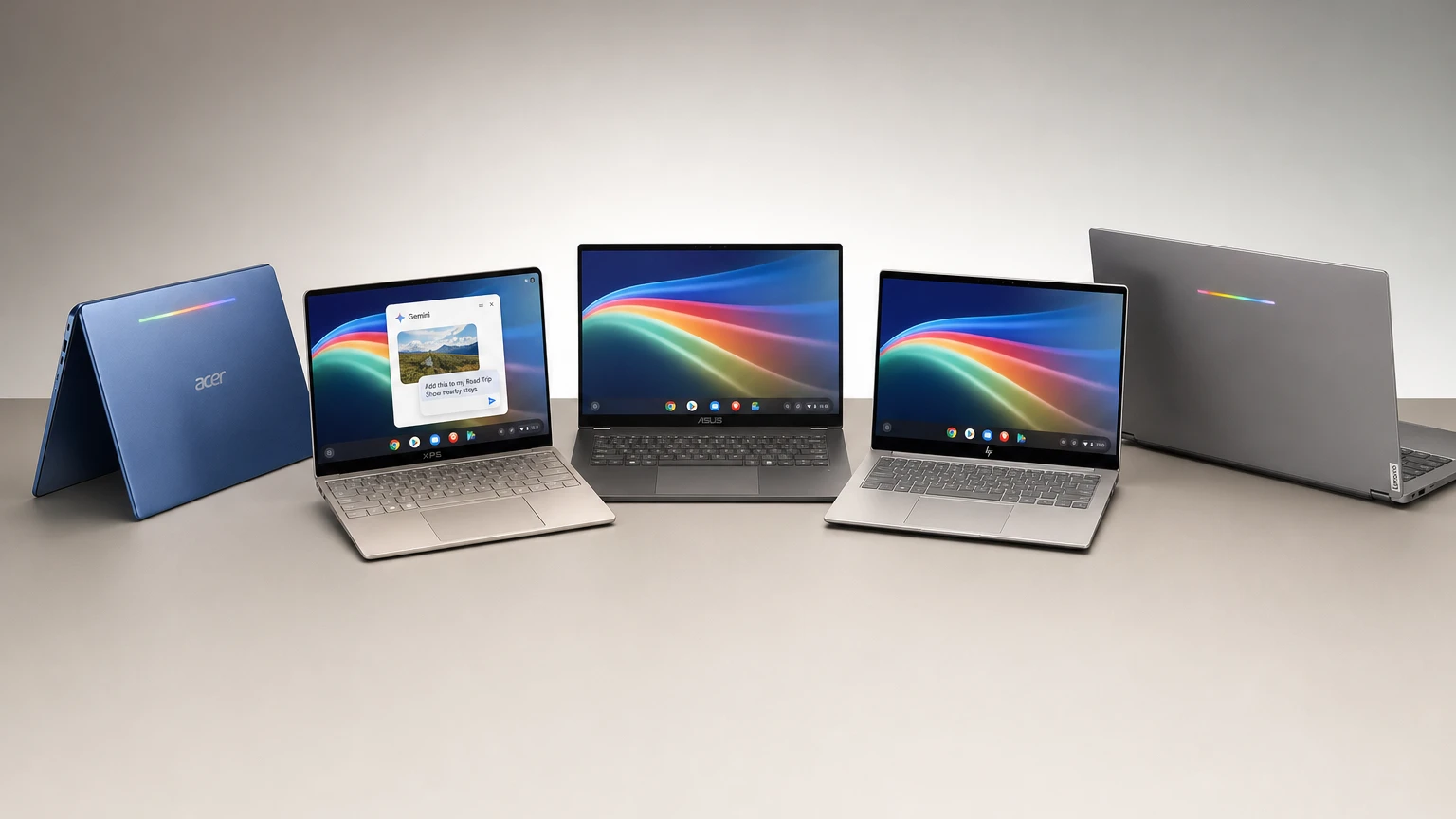
Googlebook preorders opened on September 21 for five laptops priced from $899 to $1,299, with the first models scheduled to reach U.S. stores on October 4. Acer, ASUS, Dell, HP and Lenovo are supplying the hardware, while Google controls a new laptop platform built around Android, desktop technology from ChromeOS and system-level Gemini features.
This is the commercial launch rather than the first announcement of Googlebook. Google unveiled the category on May 12 but initially provided few purchasing details. The September update establishes the launch lineup, prices, configurations and retail timetable.
Preorders are available through the Google Store, Best Buy and selected retailers. Canada, the United Kingdom, Ireland, France, Germany and Australia are due to receive the laptops on October 5.
Googlebook prices and specifications
Googlebook is a hardware category, not a single Google-built computer. The first five models cover three screen sizes and use either Intel Core Ultra or Qualcomm Snapdragon X Elite processors.
| Model | Starting price | Display | Processor | Claimed battery life | Weight |
|---|---|---|---|---|---|
| Acer Googlebook 14 | $899 | 14-inch 2.8K OLED touchscreen | Intel Core Ultra 5 | Up to 16 hours | 2.51 pounds |
| XPS Googlebook | $999 | 13.4-inch 2.5K LCD touchscreen | Snapdragon X Elite | Up to 18 hours | 2.2 pounds |
| Lenovo Googlebook 15 | $1,099 | 15.3-inch 2.8K OLED touchscreen | Intel Core Ultra 5 | Up to 13 hours | 2.84 pounds |
| ASUS Googlebook 14 | $1,299 | 14-inch 2.8K OLED touchscreen | Intel Core Ultra 5 | Up to 16 hours | 2.2 pounds |
| HP Googlebook 14 | $1,299 | 14-inch 2.8K OLED touchscreen | Snapdragon X Elite | Up to 19 hours | 2.74 pounds |
Google’s U.S. comparison page lists 16GB of RAM and 512GB of storage for each starting configuration. Every launch model also has a touchscreen, backlit keyboard and neural processing unit rated between 45 and 49 TOPS, depending on the processor.
The battery numbers are based on controlled web-browsing tests rather than independent reviews. Actual endurance will vary with screen brightness, network conditions, applications and AI use. Dell separately advertises up to 16 hours of Netflix streaming for the XPS Googlebook, illustrating why figures from different battery tests should not be compared directly.
Acer has the lowest price and the lineup’s only convertible design, which can fold into a tablet-style configuration. The XPS and ASUS models are the lightest at 2.2 pounds. Lenovo supplies the largest screen, while HP carries the highest battery claim.
What makes a Googlebook different from a Chromebook?
Googlebook uses the Android technology stack underneath a desktop environment that draws on ChromeOS. It runs Android applications natively, includes the Google Play Store and provides a desktop-class version of Chrome with extension support, conventional windows and file management.
Google is positioning the platform above the web-focused Chromebook category, with premium materials, OLED display options, haptic trackpads and more powerful processors. The two product families will continue to coexist: Google says it remains committed to ChromeOS in education and business, where lower-cost and shared devices are common.
Every Googlebook also has a Glowbar on its exterior. It illuminates during startup, displays charging and battery status and reacts to Gemini interactions. Google plans to let developers create additional animations for it.
The more consequential difference is software. Googlebook is intended to provide Android phone owners with a premium laptop that shares their mobile ecosystem while placing Gemini inside core desktop interactions. That puts the machines into competition with premium Windows and macOS laptops rather than inexpensive Chromebooks.
Gemini is built into the pointer, dictation and desktop
The signature AI feature is Magic Pointer. Wiggling the cursor summons Gemini, after which the user can select text, images or other on-screen material and ask the assistant to work with that context.
Google’s examples include converting a training schedule into Calendar events, examining a suspicious email and combining selected images without downloading and uploading them first. Google says Magic Pointer remains inactive until deliberately summoned and can be disabled.
Other Googlebook intelligence features include:
- Rambler: An AI dictation tool that removes filler words and corrections before restructuring spoken thoughts into notes, headings, checklists or action items. It supports switching languages within a sentence.
- Create My Widget: A natural-language tool for building desktop widgets such as trip countdowns, schedules and sports trackers without writing code.
- Proactive suggestions: Gemini can recommend actions based on information currently displayed on the screen.
- Gemini Spark: Certain longer-running requests can continue processing after the laptop is closed.
- Antigravity: Google’s agent-development environment is included, alongside terminal access for tools such as Antigravity CLI and Claude Code.
The presence of a dedicated NPU does not mean every Gemini function operates privately or entirely offline. Googlebook combines local processing with cloud services, and some advertised features require an internet connection or are limited by country, language, age and compatible applications. Buyers should check individual feature requirements rather than treating “designed for Gemini” as a universal offline guarantee.
Android integration could be the more practical advantage
Gemini leads Google’s marketing, but the strongest everyday argument for Googlebook may be its connection to Android phones.
During setup, supported settings, saved passwords, Wi-Fi networks and messages can move to the laptop after the user signs in. Google says that transferred information is protected with end-to-end encryption.
The platform’s main continuity tools are:
- Continue On, which places supported phone tasks on the laptop taskbar so they can be resumed on the larger screen.
- Quick Access, which makes phone photos, downloads and other files available through the laptop’s file interface.
- Cast My Apps, which streams compatible phone applications into a desktop window without installing another copy on the laptop.
These features have an important requirement: Google says they need a phone running Android 17 or later. Setup is required, and availability can vary by application and device. Owners of older phones should not assume they will receive the complete cross-device experience.
The ecosystem emphasis also makes the target customer unusually clear. Someone who already uses Android, Gmail, Drive, Photos, Calendar and Gemini is more likely to benefit than an iPhone owner whose phone does not participate in the same continuity system.
App support remains the biggest unanswered question
Googlebook combines desktop Chrome and its extensions with Android applications from Google Play. Google highlights creative applications including Adobe Photoshop, Lightroom, CapCut and BandLab, plus streaming services that can support offline viewing.
Gaming includes native Android titles and cloud-streamed PC games through GeForce NOW. Googlebook purchases include a promotional year of GeForce NOW Fast Pass, but game ownership, internet performance, monthly usage limits and regional eligibility still apply.
Developers receive an isolated Linux environment running through a security-certified pKVM hypervisor. The terminal can be used for command-line development tools, code repositories and AI coding agents without giving everything in that environment direct access to the primary operating system.
The unresolved issue is whether Android applications consistently behave like full desktop software when used with a keyboard, trackpad, large display and resizable windows. Google says millions of Play Store apps support larger screens or desktop input, and the store will identify optimized titles. Compatibility and feature parity will nevertheless depend on individual developers.
Availability in Google Play does not guarantee that an application offers all the capabilities found in its Windows or macOS edition. Buyers who rely on specialized professional software, corporate management tools, local PC games or particular hardware accessories should confirm support before ordering.
What buyers receive with a Googlebook
Eligible Googlebook buyers can claim 12 months of Google AI Pro, including 5TB of cloud storage and expanded access to Gemini features. The current terms limit that offer to new Google AI Pro subscribers who purchase and activate an eligible device on or after October 1, 2026.
A valid payment method is required, and the plan automatically renews at the prevailing subscription price unless canceled. Google’s terms currently list a post-trial U.S. price of $19.99 per month.
The broader promotional package includes limited trials for services such as YouTube Premium, BandLab, Adobe Photoshop, CapCut, Luminar and GeForce NOW. Eligibility, countries, redemption deadlines and renewal rules differ by service. Some offers exclude existing or previous subscribers.
Those subscriptions add short-term value but should not determine whether the underlying laptop is worth its price. Buyers planning to use paid Gemini features over several years should account for the cost after the included year ends.
Google also promises regular feature drops and operating-system updates for up to 10 years. Because the commitment is phrased as “up to,” buyers should confirm the applicable support period for their specific model.
Should you preorder a Googlebook?
The clearest early audience is an Android-first buyer who wants premium hardware and already works heavily inside Google’s services. Acer offers the least expensive entry point, while the XPS model combines the second-lowest price with the lineup’s lightest weight. The remaining models emphasize a larger display, OLED hardware or longer claimed endurance.
There is less reason to preorder if access to Gemini is the only objective. Many Gemini capabilities already work through browsers, Android devices and Google applications on existing computers. Googlebook must demonstrate that Magic Pointer, Rambler, phone continuity and deeper operating-system integration save enough time to justify replacing a laptop.
Waiting for reviews is the safer choice for most shoppers. As of September 22, reviewers have had limited hands-on access but have not completed long-term testing of retail hardware, battery life, thermals, standby behavior or application compatibility. The October 4 store date is close enough that independent results should arrive before long.
A preorder is therefore less risky for buyers who understand the application limitations and are committed to Android. Everyone else should wait to see whether Googlebook performs like a complete premium computer rather than an ambitious mobile platform adapted to a laptop.
What to watch after the October release
The first independent reviews should reveal how the Intel and Snapdragon models differ in speed, battery life and software compatibility. Testing should also show how often Gemini requests depend on the cloud and whether the advertised phone-continuity features are reliable across different Android brands.
App behavior will be equally important. Googlebook’s long-term prospects depend less on the number of Play Store listings than on whether major applications offer polished desktop interfaces and professional-grade capabilities.
Google has not announced a Pixel-branded Googlebook, leaving its manufacturing partners to establish the category. If those partners deliver reliable hardware and Google can make Android applications feel natural on a laptop, Googlebook could become a credible alternative for Android users. If its AI features prove optional and its applications remain inconsistent on larger screens, the platform will have a harder time justifying premium prices.
Make YouTube smarter with NextWatch AI
Use AI search, smarter discovery, playback tools and speed testing directly in your browser.
Add NextWatch AI to Chrome ↗