
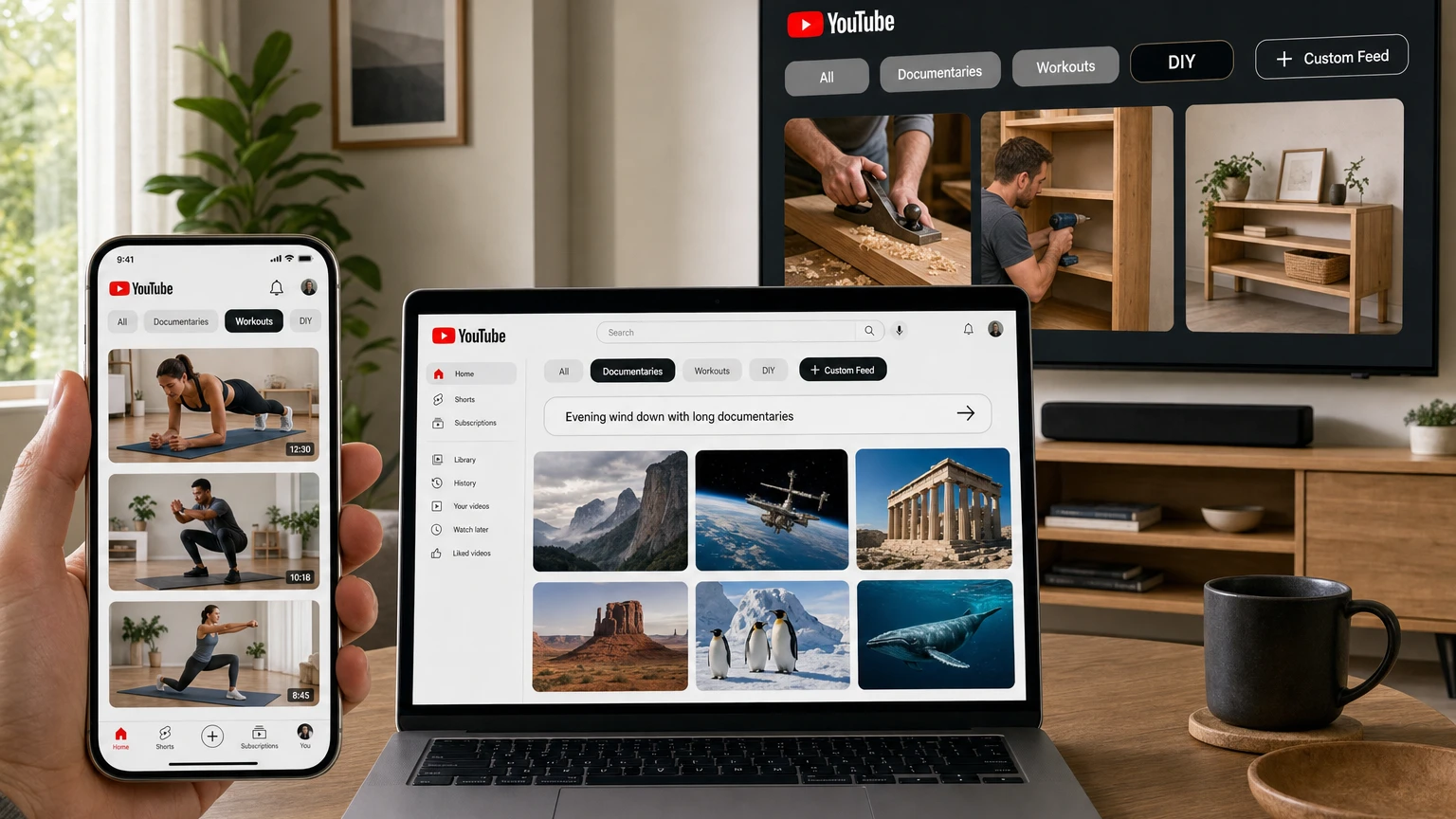
YouTube is expanding its experimental Custom Feeds feature, giving viewers a way to turn natural-language prompts into reusable recommendation tabs on the platform’s homepage.
Announced September 23 at Made On YouTube 2026, the feature will let U.S. viewers create and save multiple feeds for particular interests, routines or moods. YouTube says Custom Feeds are coming “soon” to the web, mobile apps and TVs. The company separately told TechCrunch that support for multiple feeds on web and mobile will begin rolling out in October.
A viewer might request “evening wind down with long documentaries,” “new DIY creators” or podcasts suited to a 30-minute commute. YouTube interprets the description, builds a dedicated stream of recommendations and keeps the feed accessible from the Home screen.
The standard Home feed is not going away. Custom Feeds sit beside it, offering a more direct way to express what someone wants to watch at a particular moment without replacing years of personalization.
What YouTube Custom Feeds actually do
Custom Feeds are saved recommendation spaces built around a viewer’s written instructions. Instead of entering a short search query and receiving a one-time results page, viewers can describe a broader combination of topics, formats, moods and viewing situations.
YouTube then uses AI to interpret the request and populate a dedicated feed. TechCrunch reported that the feature uses Google’s Gemini technology, while YouTube describes the interaction more generally as a conversational prompt experience.
The resulting feed stays attached to the homepage as its own tab or chip and refreshes with new recommendations. Viewers can create multiple feeds and move between them without retyping the original requests.
That makes the feature potentially useful for recurring situations. Someone could maintain separate feeds for morning exercise, technical tutorials, long weekend documentaries and light entertainment for commuting.
It is not, however, a user-programmed recommendation algorithm. Viewers cannot inspect or assign mathematical weights to ranking signals, select an alternative ranking model or determine the exact order of every video. They provide the brief; YouTube still chooses and ranks the videos.
How to create a Custom Feed
YouTube’s existing experiment provides the clearest indication of how the broader feature will work, although individual labels and steps may change during the rollout.
- Open YouTube’s Home tab. Eligible users should see a Custom Feed option among the tabs near the top of the page.
- Select the Custom Feed option. This opens a prompt field for describing the desired recommendations.
- Enter a request. The prompt can combine a subject with preferences such as video length, mood, creator type or viewing context.
- Review the generated feed. YouTube fills the tab with videos it believes match the request.
- Edit the prompt when needed. Changing the wording lets viewers refine the feed without starting a conventional search from scratch.
- Switch between saved feeds. Multiple feeds remain accessible from Home alongside the platform’s regular recommendations.
During the August experiment, YouTube let participating viewers keep up to eight active feeds. The final announcement promises support for multiple feeds but does not confirm whether eight will remain the public limit.
The experimental version also lets viewers submit feedback when a feed interprets a request poorly. Ars Technica reported that users can refine descriptions and rate suggestions, giving YouTube additional information for tuning the results.
How to write a useful Custom Feed prompt
The feature should be most useful when a request contains more detail than an ordinary topic keyword. A broad prompt such as “cooking” gives YouTube little direction beyond what a search or topic tab already provides.
A stronger prompt can combine several preferences:
- Beginner strength workouts under 20 minutes that require no equipment
- Long-form space documentaries for quiet weekend viewing
- Affordable vegetarian recipes from newer cooking channels
- Funny technology podcasts for a 30-minute commute
- Strategy-game reviews without story spoilers
- Recently uploaded woodworking tutorials without narration
WIRED found that YouTube could suggest additions such as limiting results to videos uploaded during a particular period or requesting videos without commentary. That illustrates the feature’s main advantage over basic keyword search: a viewer can express several preferences in one sentence.
Those instructions should not be confused with guaranteed filters. YouTube has not said that every recommendation will satisfy every requested condition, and the existing help documentation asks viewers to report cases in which the system interprets a prompt incorrectly.
Custom Feeds versus Home, Search and Ask YouTube
YouTube now has several discovery tools that may appear similar but are designed for different tasks.
| Feature | Viewer input | Best use |
|---|---|---|
| Home | Primarily viewing activity, subscriptions and other personalization signals | Broad recommendations across a viewer’s established interests |
| Search | A keyword, title or conventional query | Finding a specific video, channel or subject |
| Custom Feeds | A conversational description of a topic, mood, routine or preferred format | Maintaining a reusable stream of recommendations around a recurring request |
| Ask YouTube | Questions and follow-up questions | Receiving conversational answers, organized video suggestions and information while searching or watching |
Ask YouTube is therefore not another name for Custom Feeds. Ask YouTube behaves more like a conversational search and viewing assistant. Custom Feeds convert a prompt into an ongoing homepage destination.
Why Custom Feeds do not replace the main algorithm
YouTube considered giving viewers a way to steer their overall recommendation profile more directly but decided against that approach. Emily Moxley, YouTube’s vice president of product management, told WIRED that test users were concerned about damaging the personalization they had built through years of viewing.
Separate tabs offer a lower-risk alternative. A viewer can create a highly specific or temporary feed while retaining access to the ordinary Home page through the “All” tab.
The separation is not absolute. YouTube’s current help documentation says videos watched through a Custom Feed are added to normal watch history and may influence recommendations on the main Home page.
Creating a woodworking feed therefore does not replace the standard homepage, but watching several videos from it can still tell YouTube that the viewer is interested in woodworking. Anyone who wants to limit that effect will still need to manage watch history using YouTube’s existing account controls.
What remains provisional from YouTube’s tests
YouTube began rolling out a single-feed experiment to some U.S. viewers in May 2026. That version required users to be signed in, use YouTube in English and have watch and search history enabled.
An August experiment expanded the system to multiple feeds on Android, iOS and desktop. It allowed up to eight active feeds and said inactive prompts would eventually expire.
YouTube has not confirmed that all those requirements and limits will carry into the broader release. Its public announcement specifies U.S. availability and multiple saved feeds but does not list a language requirement, a final feed limit or an expiration policy.
The help page for the older experiment also describes Custom Feeds as private and unique to an account. YouTube has not announced public, collaborative or shareable feeds, but it has not yet published complete documentation for the expanded version.
Television support is another open question. YouTube confirms that Custom Feeds are coming to TVs, but it has not explained whether every supported TV app will allow viewers to create and edit detailed prompts with an on-screen keyboard or whether some television interfaces will primarily display feeds created on a phone or computer.
What Custom Feeds mean for creators
For creators, Custom Feeds add another recommendation surface rather than a separate publishing format. Videos discovered and watched through the existing experiment contribute to watch time and monetization in the same way as videos found through the normal Home feed.
YouTube says it is monitoring the feature’s effects on views, watch time and creator revenue. It has not released broad performance figures from the experiments or announced special creator controls for targeting Custom Feeds.
The most defensible implication is that YouTube will have a more explicit description of the viewer’s immediate intent when selecting recommendations. A focused tutorial, documentary, podcast or review may be eligible when its subject and format match a detailed prompt, but creators still depend on YouTube’s ranking decisions and the viewer’s choice to click.
There is no indication that creators can submit a video to a particular Custom Feed or guarantee placement by using a particular phrase. Accurate titles, thumbnails and descriptions remain important because they help viewers understand what a recommended video offers, but YouTube has not disclosed a dedicated optimization system for the new feature.
Availability and unanswered questions
As of September 24, 2026, some U.S. viewers may already have access through YouTube’s experiments. The broader version is not yet available to every eligible account.
YouTube’s official announcement says Custom Feeds will be available in the United States on web, mobile and TVs “soon.” TechCrunch reports that the multiple-feed rollout on web and mobile begins in October. No exact release day, international timetable or complete list of eligibility requirements has been announced.
Important questions remain, including whether the eight-feed experimental limit will survive, how consistently the system will follow exclusions, which languages will be supported and how prompt creation will work on televisions.
Even with those unknowns, the central idea is clear: YouTube is adding an explicit layer of viewer input to a recommendation system that has historically learned mainly from behavior. Custom Feeds will not let people rewrite YouTube’s algorithm, but they will provide a faster way to tell it what they want to watch right now—and save that request for later.
Make YouTube smarter with NextWatch AI
Use AI search, smarter discovery, playback tools and speed testing directly in your browser.
Add NextWatch AI to Chrome ↗